
Download Chatty Tutor – AI‑Powered English Learning Tool for Fast Fluency
Introduction
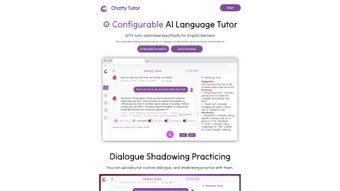
Chatty Tutor is an AI‑driven language learning platform that brings the power of Generative Pre‑trained Transformers (GPT) to English learners of every level. Unlike traditional textbook‑based apps, Chatty Tutor creates a dynamic, conversation‑first environment where learners can speak, listen, and receive instant, data‑rich feedback. The tool lets you customize prompts, choose from a variety of voice characters, and adjust speech speed, so the learning experience mirrors real‑world dialogue.
One of its most compelling features is dialogue shadowing practice—an immersive technique where you repeat AI‑generated sentences in real time, boosting pronunciation, rhythm, and confidence. In addition, the platform offers visual vocabulary aids, pronunciation assessments with detailed scoring, and a clean browser‑based interface that also runs natively on macOS. While the lack of a dedicated mobile app and the macOS‑only desktop support may limit accessibility for some users, the depth of interactivity and the quality of AI‑generated content make Chatty Tutor a standout choice for anyone serious about mastering English quickly and enjoyably.
Whether you are a student preparing for exams, a professional polishing business communication, or a traveler looking to converse fluently, Chatty Tutor adapts to your goals and provides measurable progress with every session.
Key Features That Set Chatty Tutor Apart
The heart of Chatty Tutor lies in its sophisticated AI engine and the suite of tools built around it. Every feature is designed to keep learners engaged, provide instant corrective feedback, and accelerate fluency through active practice. Below is a comprehensive list of the most valuable capabilities, each explained in detail to help you understand how they contribute to a richer learning experience.
- GPT‑Optimized Dialogue Generation: Leverages the latest GPT models to produce natural, context‑aware conversations that adapt to your proficiency level. The system tracks your previous interactions, ensuring continuity and progressive difficulty.
- Customizable Voice Characters: Choose from male, female, and neutral voices with adjustable accents and speaking speeds to match your listening preferences. This flexibility helps learners become comfortable with a range of English dialects.
- Dialogue Shadowing Practice: Real‑time shadowing mode lets you repeat AI sentences while tracking timing and intonation, a proven method for fluency acceleration. Visual waveforms and timing markers guide you toward native‑like rhythm.
- Pronunciation Assessment Engine: Uses acoustic analysis to score your speech, highlighting problem phonemes and offering corrective suggestions. Scores are broken down by syllable, vowel, and consonant for granular insight.
- Visual Vocabulary Tools: Interactive flashcards, image‑linked word banks, and contextual sentence examples improve retention through multimodal learning. Each word is accompanied by pronunciation audio and usage notes.
- Browser‑Based Access + macOS App: No heavy downloads needed; you can start learning instantly on any modern browser, and a native macOS client provides offline capabilities for pre‑downloaded lessons.
- Prompt Personalization: Write your own conversation starters or let the AI suggest topics ranging from travel to business English, ensuring relevance to your personal or professional interests.
- Progress Analytics Dashboard: Track daily practice time, pronunciation scores, and vocabulary growth with clear visual charts. Exportable PDF reports let you share progress with teachers or employers.
Together, these features create an ecosystem where speaking practice, vocabulary building, and pronunciation correction happen simultaneously, eliminating the fragmented approach typical of many language apps. The result is a cohesive, engaging experience that keeps learners motivated day after day.
Installation & Usage – Getting Started in Minutes
Starting with Chatty Tutor is intentionally frictionless. Because the core service runs in the cloud, you only need a stable internet connection and a supported browser (Chrome, Safari, or Edge). Follow these steps to download, install, and begin your first lesson:
- Visit the Official Site: Navigate to www.chattytutor.com and click the “Start Free Trial” button. You’ll be prompted to create an account using an email address or social login.
- Verify Your Email: A confirmation link arrives within seconds. Clicking it activates your account and unlocks the full feature set for a 7‑day trial.
- Choose Your Platform: For browser use, simply stay on the website and begin a session. macOS users can download the dedicated client by clicking “Download for macOS,” which provides a signed .dmg file.
- Install the macOS Client (Optional): Open the .dmg, drag the Chatty Tutor icon into your Applications folder, and launch the app. The first run will ask for permission to access your microphone—grant it for pronunciation analysis.
- Set Up Your Learning Profile: Input your current English level (A1‑C2), preferred learning goals (e.g., business communication, travel), and select a voice character. The platform tailors the difficulty and content automatically.
- Start a Dialogue Session: Click “New Conversation,” choose a topic, and the AI will generate a prompt. Speak into your microphone; the system records, evaluates, and provides instant feedback.
- Use Shadowing Mode: Activate the shadowing toggle to hear the AI phrase, then repeat it in real time. The UI displays a waveform and timing markers so you can see how closely you match the native rhythm.
- Review Your Progress: After each session, visit the “Dashboard” to view pronunciation scores, vocabulary words added, and overall practice time. Export reports as PDF for offline review.
The learning curve is gentle because the interface mirrors familiar chat apps—messages appear in speech bubbles, and all controls are accessible with a single click. For users who prefer a more structured curriculum, Chatty Tutor also offers pre‑made lesson paths, each consisting of ten progressive dialogues, quizzes, and pronunciation drills. Whether you spend five minutes a day or two hours, the platform scales to match your commitment level.
Compatibility, Pros & Cons, and Frequently Asked Questions
Supported Operating Systems
Chatty Tutor runs on any modern web browser, which means it works on Windows, Linux, ChromeOS, and macOS without the need for additional software. A native desktop client is currently available for macOS 10.15+ only. No Windows, Android, or iOS mobile apps exist at this time, which may be a drawback for users who study on the go. However, the browser version is fully functional on mobile browsers, offering a responsive experience for occasional tablet or phone use.
Pros
- AI‑generated, context‑aware conversations feel natural and keep learners engaged.
- Customizable voice and speed options accommodate diverse listening preferences.
- Shadowing practice directly targets fluency, a feature rarely found in other language apps.
- Pronunciation scoring provides concrete, actionable feedback rather than vague encouragement.
- Visual vocabulary aids support multimodal learning, improving recall.
- Browser‑based access eliminates heavy installations and ensures automatic updates.
Cons
- No dedicated mobile app for Android or iOS limits learning on smartphones and tablets.
- Desktop client is macOS‑only, leaving Windows users reliant on the browser version.
- Custom dialogue creation requires user input; the AI does not generate entirely new scenarios without prompts.
- Free tier limits daily practice time, encouraging an upgrade to the paid plan for serious learners.
FAQ – Your Questions Answered
Below are the most common queries from new users. Each answer is crafted to give you a clear understanding of how Chatty Tutor works and what you can expect from the platform.
Is Chatty Tutor suitable for absolute beginners?
Yes. When you create your profile, you can select “Beginner (A1)” and the AI will generate simple sentences, basic vocabulary, and slower speech rates. The shadowing mode also includes visual cues to help you match pronunciation.
Can I use Chatty Tutor without an internet connection?
The macOS desktop client offers limited offline functionality for previously downloaded lessons. However, the AI dialogue generation and pronunciation assessment require an online connection.
How does the pronunciation assessment work?
The system records your speech, extracts phonetic features, and compares them to native speaker models. You receive a score (0‑100) for each phoneme, plus tips on mouth position and intonation.
What payment plans are available?
Chatty Tutor offers a free trial, a monthly subscription at $14.99, and an annual plan at $149 (two months free). All plans include unlimited access to dialogues, shadowing, and pronunciation feedback.
Is my data safe when I speak into the microphone?
Yes. Audio recordings are encrypted in transit and stored only for the duration of the analysis. The platform complies with GDPR and does not sell personal data to third parties.
Reviewer Verdict: Chatty Tutor delivers a sophisticated AI‑driven learning experience that rivals premium language schools, especially for learners who thrive on speaking practice. Its few platform limitations are outweighed by the depth of interaction and measurable progress tracking.
Conclusion – Take the Leap and Download Chatty Tutor Today
If you’ve tried static flashcard apps or video lessons that leave you passive, Chatty Tutor offers a refreshing, active alternative that puts conversation at the heart of learning. The combination of GPT‑powered dialogues, customizable voice settings, and real‑time shadowing creates a classroom‑like atmosphere right on your screen. While the lack of a mobile app may be a short‑term inconvenience, the browser accessibility ensures you can start instantly on any computer, and macOS users enjoy a smooth native client. With clear pronunciation scoring and visual vocabulary tools, you’ll see measurable improvement in just a few weeks of consistent practice.
Ready to speak English with confidence? Download Chatty Tutor now, claim your free trial, and experience the future of language learning. Whether you’re preparing for an interview, traveling abroad, or simply expanding your skill set, Chatty Tutor equips you with the tools to turn every conversation into a learning opportunity.



.png)



